
This is just a way to get people up-to-date on what I’m working on.
Your House Is Wasting Energy Right Now
How a smart energy management system pays for itself — and how you and AI can build one fitted exactly to your home
Here’s a question worth sitting with: what percentage of the energy your home consumes right now is actually being used by anyone? Maybe first we should explain why that matters to you. Energy used to be cheap and fairly reliable. It’s not now, and it’s going to get a lot more expensive — soon. The time to do something about that is NOT when you can’t afford to keep your home comfortable. It’s now.
If you’re at work, the answer to how much power is actually being used by anyone is probably close to zero. But your water heater is keeping 50 gallons at 120°F. Your thermostat is maintaining a comfortable temperature in rooms nobody is sitting in. And depending on what your home is like, other loads are running for the benefit of no one, burning energy so the house will be ready when you walk back through the door.
That sounds kind of stupid when you think about it, but it wasn’t worth fixing when energy was cheap. Now it’s expensive, and I’ve built a cheap way to fix it — that will deliver a return on investment almost immediately.
So What’s the Fix?
This description isn’t the entire system — just one part of a more complex whole. But this part is easy to describe and understand. The system you build will do a lot more, and we’ll get to that. We’re going to describe this as if there were just one person living at your home, but of course it works for everyone who actually lives there.
Your phone knows where you are. It also knows your speed, your direction, and your likely destination. Every navigation app on the planet uses this data. Your energy management system can too.
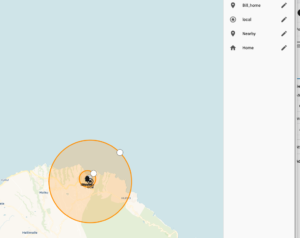
This is the actual zone I’m using to determine when I have left our house or I’m returning.
The basic concept: when your phone crosses an outbound radius around your home, the system knows you’ve left. It adjusts your home to suit no one being there. Water heater drops to a maintenance temperature. Thermostat backs off — not to off, just enough to stop fighting physics. If it’s 90°F outside and nobody’s home, there’s no reason to keep the house at 72°F. Let it drift to 82°F. At that differential, heat transfer from outside nearly stops, and it takes almost no energy to hold it there. When you head home, your phone crosses the inbound radius. Your phone’s location data includes velocity and heading. Once the system sees you moving toward home at highway speed, it can calculate your arrival time within a few minutes and stage the recovery accordingly. Walk in the door and everything is normal. Not cold. Not stuffy. Not twenty minutes behind. You’ll never notice the difference — except on your utility bill.
In the addendum we talk about price — that’s for the hardware, which is off-the-shelf stuff. The software, which is really the system, is free. Built on open source software, using AI at the free or cheap level to implement, customize and configure. No subscriptions, no cloud, smart, very capable, expandable, and free.
Want to Know More?
The rest of this description goes into the weeds. Sorry, but this is a complex system, built in a new way that AI enables. The good news is, the rest of this document is optional. You’ve already read the good stuff. Here’s the summary:
A system cheap enough to deliver an ROI almost immediately
Maintains the comfort level of your home when there is someone there to enjoy it, while still reducing your energy bills
Can be expanded into an advanced security system and wildfire mitigation system without replacing equipment you’ve already bought
Addendum
What the System Manages
Location-aware control is the most intuitive piece, but a well-built energy management system coordinates much more.
Water Heating
Water heaters are typically 15–20% of total home energy consumption, and among the most wasteful loads — running 24/7 to maintain temperature whether anyone is home, awake, or planning to shower. But they also store energy, so smart management works on three principles: occupancy (heat when people are home, drop to minimum when they’re not), solar production (run the heater at higher thermostat settings when your panels are generating excess power, to store heat), and time-of-use rates (shift heating to off-peak windows when grid electricity is cheapest). Same hot water availability, significantly lower cost.
HVAC and Climate Control
Typically the single largest residential energy expense, and the biggest opportunity. Adaptive control based on actual occupancy, outdoor temperature, your home’s thermal mass, weather forecasts, and utility pricing can reduce climate control costs by 20–40% without any sacrifice in comfort. How do you determine thermal mass? You don’t — the system figures that out.
Pool Equipment
Pool pumps are notorious consumers — a single-speed pump running 8 hours a day can rival your HVAC for power consumption. Smart management shifts filtration to solar production hours and adjusts run duration based on actual conditions rather than a fixed timer.
Phantom Loads
The average home has 20–40 devices drawing standby power continuously — TVs, entertainment systems, chargers, office equipment. A $12 smart plug with power monitoring identifies the worst offenders and cuts them when nobody’s home.
You’ll Build It — With Expert Help From Claude
Here’s the question at the center of this: how can a system understand what you need, how your home works, and how you and your family actually use energy?
It will — because you’ll design it, with expert help from Claude.
You don’t need to be a programmer. You don’t need expertise in home automation or energy systems. All you need to know is what you want. You and Claude build it together. And once you’ve lived with it for a while and know what works and what doesn’t, you and Claude change it, tune it, perfect it.
The Battery and Solar Layer
You don’t have to have solar for the system to work, but with solar and battery storage you’re not just managing when loads run — you’re managing a small power plant that gives you more options and more resilience. A full system adds several operating modes: self-consumption (solar first, battery second, grid as last resort), time-of-use arbitrage (charge cheap, discharge during expensive peak hours), excess solar capture (route surplus to water heating or battery rather than exporting at low rates), and reserve management (maintain a defined minimum for outages, never depleted by routine loads). Even a relatively cheap portable battery/inverter like a Jackery or EcoFlow unit will launch your home into this more capable layer and make it somewhat resilient to outages. The EMS manages those devices for you.
The system monitors production and consumption in real time, making adjustments every few seconds rather than on a fixed schedule. This is active management — the same kind a facilities engineer would apply to a commercial building, running continuously in your home.
How This Compares to What You Can Buy
You might reasonably ask: can’t I just buy something that does this? The short answer is no — not as an integrated system. Here’s what the commercial market actually offers.
Energy Monitors (Emporia Vue, Sense): These are dashboards. They tell you what you’re using, circuit by circuit. Genuinely useful for understanding consumption patterns — the Emporia Vue 3 at around $150 is the standout product in this category. But they don’t control anything. They watch; they don’t act. And yes, if you have one, it can be included in the system. I have one in my Maui home — very handy, but not an overall solution.
Smart Thermostats (Nest, Ecobee): Good at one thing: occupancy-aware HVAC. They operate in isolation — they don’t know what your solar panels are producing, what your water heater is doing, or what your utility charges right now. Single-system optimization, not whole-home coordination. And they aren’t very good at knowing where you are. Nice, but not really smart. Home Assistant works with them, so they plug right into this system.
Smart Panels (Span): The most ambitious commercial product — replaces your electrical panel with circuit-level monitoring and control. Starts around $2,500–6,000 hardware plus $2,000–4,000 professional installation. Manages circuits, not the intelligence layer above them. I like the idea, but not the price or the limited functionality — it gives you control, but you’re still the brains. Home Assistant communicates directly with Span panels over your local network using gRPC — no cloud, no API keys, no dependency on Span’s servers.
Inverter-Bundled Systems (SolarEdge, Enphase): Solar manufacturers have built energy management into their platforms — but only for their own hardware ecosystem. They don’t talk to your water heater or your pool pump. Each system optimizes its own piece independently. Home Assistant brings it all into the system.
The fundamental gap: commercial products either monitor without acting, or act on one system without coordinating the whole. None tie together solar production, battery state, water heating, pool equipment, occupancy, and utility pricing into a single decision-making layer. That integration is what actually moves the needle on your bill.
One independent review of the HEMS market concluded that most available systems don’t support home automation or intelligence to adjust energy consumption based on user preferences and goals. The proprietary ones are easy to deploy but support little real automation. The open-source ones are powerful but too hard for non-technical users to deploy. That’s exactly the gap this system is designed to close.
How It Actually Works
The platform underneath is Home Assistant — open-source, running locally on a ~$100 Raspberry Pi, supporting thousands of devices, no subscription, your data stays in your home. What’s really new is the deployment model. The system ships as a comprehensive knowledge file — a single document containing everything: every supported device and its integration method, all the automation logic patterns, bill of materials at each tier, configuration templates, and tuning guidance. You load this file into your own Claude Project, and it becomes your personal EMS configurator and builder.
From there, building your system is a conversation:
Describe your home — what systems you have, how you live, what your utility rate structure looks like
Describe what you want — ‘heat water during solar production hours,’ ‘I want the house at 76°F when we get home,’ ‘don’t run the pool after 10pm’
Claude generates your specific configuration — validated, ready to paste into Home Assistant
Run it, see what you want to change, describe the change, update
That’s it. Copy, paste, test, refine. When things change — new appliance, different schedule, utility changes its rates — you describe the change and get an updated configuration. No support ticket. No waiting for a vendor update. No programming.
This isn’t a product you buy. It’s a system you build — precisely fitted to your home, your habits, and your goals — with AI doing the technical heavy lifting.
Once I had the structure in place, I built the prototype energy management system for my house on Maui in about four hours, starting from scratch, working with Claude. Integrating the solar inverter, configuring solar-aware water heater logic, setting up location-based occupancy triggers, writing battery reserve tiers — all of it built through conversation, pasted in, tested, adjusted. No prior expertise in Home Assistant required.
Yes, I already had Home Assistant up and running, and I’ve been playing with it for years, along with a hand-coded similar system I designed for, of all things, a really stupid 1973 GMC motorhome project I poured money and time into about five years ago. The thing is still sitting at my shop — 75% done, halted when I remembered I really don’t like motorhomes. The point is: I’ve been building versions of this for a long time. This one actually works.
The System Grows With You — Nothing Gets Thrown Away
The underlying structure is designed to scale up or down additively. Every component you add builds on what’s already there. You start with what makes sense for your situation and budget, and expand from there — each tier fully functional on its own, each one making the next tier more valuable.
And when you’re ready to go further, the same foundation supports some genuinely powerful additions. AI-enabled security cameras that detect and alert on specific events rather than just recording. A whole-home fire mitigation system with automated sprinkler response. Both build directly on what you’ll already have — the Raspberry Pi, the network infrastructure, the Home Assistant platform, the location and occupancy awareness. Nothing built for energy management gets replaced. It just becomes part of a more capable whole.
The Modular Build Path
Starting Point: Monitoring and Basic Automation (~$150–300)
Raspberry Pi running Home Assistant, smart plugs with power monitoring, your phone. Real-time consumption visibility, location-based automation for lights, smart HVAC (if you have it), smart water heater (if you have one), and basic loads. A baseline picture of where your energy goes. Useful on its own and the foundation for everything else.
Adding Appliance Intelligence (~$200–500 additional)
Smart switches for your dumb water heater, HVAC integration, pool pump control. High-draw loads under active management. This is where meaningful bill reduction starts. Some of your appliances might already be smart — the Starting Point system can control them natively.
Adding Solar Awareness
If you have solar, integrating your inverter data into Home Assistant is often free — most modern inverters have a local API or can be read via a simple adapter. Now the system makes decisions based on what your panels are producing, not just the clock.
Full System with Battery Storage
Larger solar, inverter, and battery storage enables more time-of-use arbitrage, more outage resilience, and genuine energy independence. At this level you have a home power plant manager. Every lower tier remains fully functional — nothing replaced, only added to.
What It Looks Like Day to Day
Morning departure: Both phones leave the property. Water heater drops to holding temperature. Pool filtration shifts to a midday solar window. Phantom loads cut power to standby devices. HVAC drops to a minimum level that protects your home — you decide what that is.
Midday solar peak: Production exceeds consumption. Excess power routes to the water heater — heating for free. Battery tops up. Pool pump runs its full cycle.
Homeward bound: Phones detected moving toward home at highway speed. Arrival time calculated. Climate adjusted to reach comfort settings on schedule. You walk in to a normal house.
Utility peak hours: Battery discharges to cover household loads. Grid draw drops to near zero during the most expensive rate window. Battery recharges from solar the next morning.
Away for a week: System drops to minimal maintenance mode — water heater at minimum safe temperature, pool on minimum filtration, everything else off. Estimated savings versus normal operation: 40–60% of weekly energy cost.
The Honest Caveats
Location-based automation works well when phones are reliable — but phones lose coverage, run out of battery, and occasionally get left behind. We’ve made it somewhat better by using the Home Assistant companion app installed on our phones instead of just native phone location, but graceful fallback logic for edge cases is still being refined.
The setup requires some technical comfort. The AI-configured model lowers the bar considerably, but you still need to be comfortable with basic command-line operations. That’s a real constraint, but a relatively easy one to overcome.
And like any automation system, it needs tuning. The first few weeks involve calibration — adjusting location radii, getting recovery timing right, learning actual patterns. It gets better with use.
We’re still building this. If someone wanted a version today I could jump ahead, cobble together something useful, and give them a file from my git repo to load into their instance of Claude. None of these are showstoppers. They’re just honest.
Where This Is Going
My Maui house is an unusual test environment — no heat or AC, mild climate, off-grid guest house. The real test will be our house in Hood River, Oregon: proper winters, real HVAC, time-of-use utility rates, and a lifestyle involving a lot of coming and going. I’ll be documenting that build-out as it happens.
The knowledge file — the AI deployment package that makes all of this buildable by anyone — is in active development. The goal is a document any homeowner can load into their Claude Project and use to build a system precisely fitted to their home, in an afternoon.
If you’re interested in building something like this, or already running Home Assistant and want to compare notes, I’d like to hear from you. The whole point of doing this in the open is that it gets better when more people are working on it.
Bill Babcock
ExpertAmateur.com