
March 2026 • 10 min read • Beginner-friendly
If you’ve been watching your electricity bill climb every month and thinking “I wish I could do something about this” — this post is for you. You don’t need a rooftop. You don’t need an electrician. You don’t need to spend $20,000. What you need is a south, east or west-facing balcony, deck, or space on a wall. A typical 15 amp 110V wall outlet, and a willingness to tinker a little.
Balcony solar is having a moment right now, and I think it’s about to get a lot bigger. Pair it with a simple Home Assistant Energy Management System (EMS), and you’ve got a genuinely smart little power system that pays for itself — and teaches you a ton along the way. And you don’t need abandon equipment if you decide to go bigger. This is the first rung of the ExpertAmateur energy ladder. Whether you stop here or keep climbing toward a full solar-plus-battery off-grid setup, everything you learn, buy or build applies and remains useful.
What is Balcony Solar?
Balcony solar — also called plug-in solar or plug-and-play solar — is exactly what it sounds like: a few solar panels that you attach to a railing, wall, shed roof, fence, or patio surface, connected to a microinverter, and plugged into a standard wall outlet. No roof work, no permits (in most cases), and no electrician.
The concept exploded in Germany over the last few years. Germany now has somewhere around 4 million of these systems installed — you can literally buy one at IKEA there. The US has been slower because of utility regulations, but that’s changing fast. Utah passed the first US “plug-and-play solar” law in 2025, exempting systems under 1.2 kW from utility interconnection requirements. Virginia passed similar legislation in March 2026 with a 96–0 vote
More than 20 states currently have active bills working their way through. California is likely to pass legislation this year. Most states are likely to permit it for one simple reason–it’s stupid and indefensible to not allow it.
A new safety standard (UL 3700) is being finalized that will give manufacturers — and consumers — a clear certification target. Right now the US is in a gray area legally. Some utilities are fine with it, some aren’t. Check your local rules before you plug in. But momentum is clearly moving toward widespread legalization.
How It Works (The Simple Version)
Here’s the basic physics in plain English: Sunlight hits the panel and generates DC electricity. A microinverter converts that DC to AC — the electricity your house runs on. That AC power feeds into your home’s wiring through the outlet it’s plugged into. Your appliances use that solar power first, drawing less from the grid. Your meter spins slower (or backward, if your utility supports net metering). A standard 800-watt balcony kit typically covers 15–25% of an average apartment’s monthly electricity needs. A 400-watt system produces roughly 300–600 kWh, A 1200 watt system (the usual maximum to avoid permits) will generate 900 to 1800KWh per year depending on your location and panel orientation. At average US electricity rates, that’s meaningful money back in your pocket. Quick math: A $1,000 system producing 1,000 kWh/year at $0.15/kWh saves you $150/year. Payback in about 6–7 years — less if your rates are higher. Add an Energy Management System that you can build yourself with Claude’s help for a few hundred bucks and the time to payback is drastically reduced.
What You Need to Get Started
Hardware: 1–2 solar panels (400W bifacial panels are the sweet spot right now, running $150–$300 each)
A microinverter rated for your panel wattage (Hoymiles and APsystems are popular choices)
Mounting hardware — zip ties and balcony rail clamps work fine for most setups
A short cable to reach your nearest outdoor outlet
All-in-one kits are starting to appear in the US market, typically $400–$1,200 depending on wattage. DIYers in states with clearer regulations are already mixing and matching panels with inverters from different sources.
Optional (but recommended) Add-ons
A smart plug with energy monitoring — lets you see real-time production data
A LiFePO4 battery/inverter “generator” — stores excess daytime production for evening use. These device are usually fed DC if you’re using PV panels to charge them, but there are some now that can be ac coupled directly through the outlet so during an outage you can just plug the balcony solar into one of the outlets and the battery/inverter will supply the AC signal. The other outlets on the “generator” can provide power to your important loads during the outage by plugging them directly into the generator. If the outage lasts days the balcony power system charges it whenever there is sun.
Home Assistant running on a Raspberry Pi or an old computer you no longer use— this is where the EMS magic happens
Energy Management System (EMS): Making It Smart
Think of this as a layered system where each layer makes the one below it more effective:
Layer 1 — The Panel
One or two 400W bifacial panels on your balcony, railing, or patio. This is your generation source. Without the layers above it, this is all you have: passive power when the sun shines.
Layer 2 — The Battery/Inverter
A portable power station (LiFePO4 chemistry — safer, longer cycle life) in the 1–3 kWh range is the right fit for most apartments. This stores excess daytime production and makes it dispatchable — you decide when it’s used, not the sun. Some units like the EcoFlow Delta Pro can also act as an uninterruptible power supply for your critical loads. At this layer you’ve transformed a passive system into an active one. But without Layer 3, you’re still just charging and discharging manually or on a fixed schedule.
Layer 3 — The Energy Management System (EMS)
This is Home Assistant running on a Raspberry Pi, with a few sensors and automations. The EMS watches your solar production in real time, monitors your battery state of charge, knows your electricity rate schedule (if your utility has time-of-use pricing), and makes decisions accordingly.
Key automations at this layer:
Solar threshold charging–When panel output exceeds baseline loads, direct excess to battery
Load shifting–Run high-draw appliances (dishwasher, laundry, AC) automatically when solar is producing
TOU optimization–Draw from battery during peak-rate hours, charge from grid during off-peak if needed
Battery protection–Never discharge below a set percentage SoC–prioritize overnight reserve based on tomorrow’s forecast
The EMS is what separates a smart system from a dumb one. Same hardware, meaningfully better outcomes.
Layer 4 — Presence Detection
This is where the system becomes genuinely intelligent rather than just automated. Presence detection tells your EMS whether anyone is home — and changes the logic accordingly. Presence detection can come from phone GPS/WiFi, a door sensor, a motion sensor, or a combination. Once the EMS knows occupancy state, it can make decisions that a schedule-based system never could:
Nobody home, solar producing: Don’t run the AC. Charge the battery instead. No point cooling or heating an empty home beyond what’s needed to quicly bring it back to a comfortable temperature.
Someone arriving in 15 minutes, battery charged: Pre-cool or heat using stored solar before they walk in
Everyone just left: Cut HVAC immediately regardless of schedule or thermostat setting
Peak solar + someone home: Run the HVAC now from direct solar, not from the battery or grid at peak rates
Guest expected, cloudy day: Draw down battery to cover comfort loads; flag that tomorrow’s solar should recharge,
Window AC or heat pump units are typically 400–600W — often the single largest load in an apartment system. Getting AC management right can be the difference between a battery that lasts all evening and one that’s depleted by 4pm.
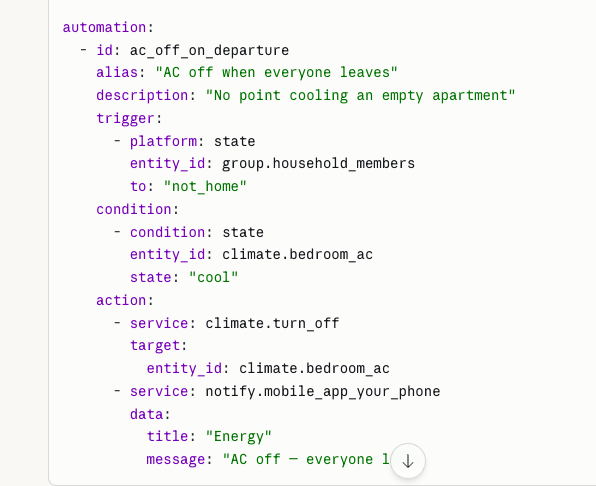
This sounds complicated, but here’s how it becomes approachable. The system I’m building works with Claude, Anthropic’s AI system that a huge number of people are already using. You can start a Project in Claude, dump a file that will be available in a month or two from us for free into Claude, and you have an expert who knows everything about the system, who will build a version–expressly designed for you and your living situation–in response to a conversation you have with Claude. You tell Claude what you want and what hardware you have to run the system. Claude builds it all for you and guides you through installing it–on cheap, off the shelf hardware. Claude will help you configure it to perfectly fit your needs. Once it’s up and running Claude helps you tune and calibrate it. When you want to change something, you tell Claude and Claude steps you through the steps required to make your changes. If you want the porch and walkway lights to come on if it’s dark when you get within 100 yards of your house–tell Claude. He’ll tell you what hardware to add, how to install it, and write the configuration code that makes it work.
It’s literally copy/paste if you like, or you can ask Claude to explain every step so you can understand the system fully. And since it’s built on Home Assistant, everything else HA can do (a HUGE library of things) Claude can help you do. If there’s nothing in the library for something you want, Claude can help you come up with a work-around. Claude can step your through the process of building complex automations or just give you the YAML code to paste in. YAML is the markup language Home assistant uses to build stuff. Claude writes better YAML than I do, Here’s a sample:
Is This Legal Where I Live?
Short answer: it depends. The legal landscape in the US is shifting rapidly right now. Here’s how to check:
Search your state + “plug-in solar”, “portable solar generation” or “balcony solar” to see if legislation has passed or is pending. For example, if you search for those topics in California you’ll find SB 868 Electricity: portable solar generation devices. Check your utility’s interconnection policy — many have small-system exemptions, Ask your landlord or HOA if you rent or live in a managed community. In Hawaii specifically, HECO (Hawaiian Electric) has been evolving its distributed generation policies — check their current small-generator rules. Even in gray-area states, thousands of people are running these systems. The risk profile is low, and the movement toward legalization is clear. But know your local situation.
What I’m Building on Maui
My system is a few steps further down the road — a full EG4 18kPV solar-plus-battery setup powering our guest house, pool equipment, and fire sprinkler system, all managed through Home Assistant. But the principles are identical. The EMS I run on a big house and complex hybrid system is the same logic you’d run on a $400 balcony panel. That’s our point. You don’t have to start big. Start with a panel on your balcony and a smart plug. Add automations as you learn. The system grows with you.
Next post: I’ll walk through setting up your first energy monitoring sensor in Home Assistant and writing your first production-based automation. No coding required. And if you’re in Hawaii — yes, this stuff works here. Year-round sun, high HECO rates, and an increasingly severe wildfire risk make energy independence one of the smartest investments you can make.